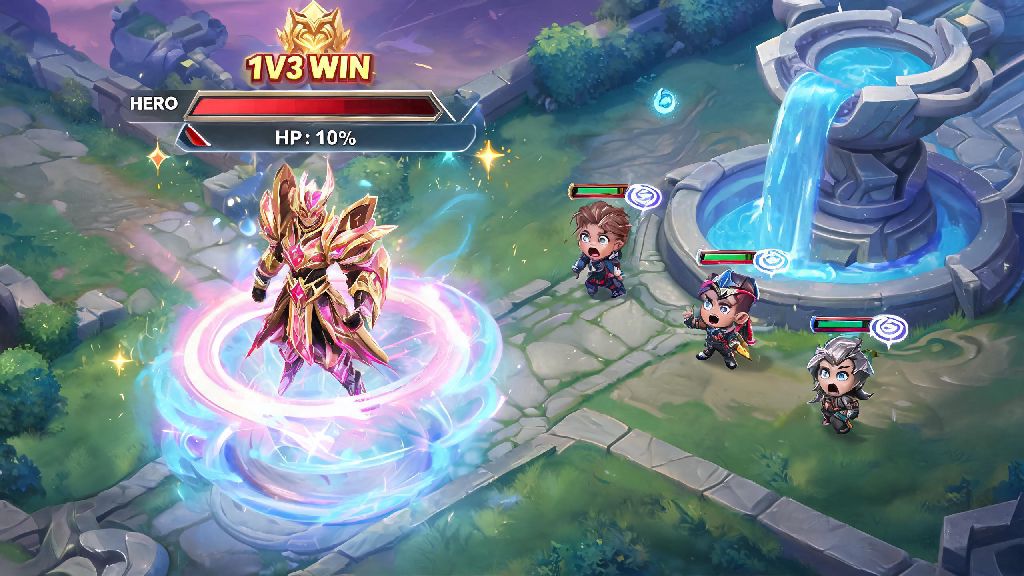
There’s nothing more satisfying than acing a 1v3 team fight, escaping with 10% health, and triggering a flashy, unique recall animation while your stunned enemies watch from the fountain. If you’re tired of the boring default recall effect and want to add a personal touch to your gameplay, you’ve probably wondered how to buy recall in Mobile Legends. You’re not alone – thousands of new players search for this every month, and most have no idea there are both paid and free options to get cool, rare recall effects for their account.
What You Need to Know Before You Buy Recall in Mobile Legends
First, let’s clear up a common myth that trips up a lot of new players: recall effects are 100% cosmetic. They don’t make your recall faster, they don’t give you any shield or buff during the recall animation, and they don’t impact your gameplay performance at all. They’re just a fun way to show off your personality, flex limited edition rewards, or match your favorite hero’s theme. I’ve seen players waste hundreds of diamonds on recall effects they thought would give them a competitive edge, so don’t make that same mistake.
Before you start shopping for recall effects, there are a few basic prerequisites you need to meet to access purchases in game:
It’s also important to note that not all recall effects are permanent. Some are only available for 7 or 30 days after purchase, while others stay in your inventory forever. Always check the purchase details before you confirm your buy to avoid wasting diamonds on an effect that will expire in a week. Recall effects do not impact recall speed or any other gameplay stat, so only buy one if you actually like how it looks, not because you think it will help you win more matches. Limited edition recall effects are only available for 1-2 weeks on average, so if you see one that matches your style perfectly, don’t wait too long to grab it before it’s gone for good.
Step-by-Step Process to Buy Permanent Recall Effects From the MLBB Shop
If you want a permanent recall effect that you can use whenever you want, the easiest place to get one is the official in-game shop. The process is super straightforward, even if you’ve never made a purchase in MLBB before. I’ve bought 4 permanent recall effects from the shop over the last 3 years, so I’ve walked through this process dozens of times.
First, open Mobile Legends and log in to your main account, making sure you’re on the main home screen where you can see your profile icon, event notifications, and game mode options. Tap the Shop icon on the left side of the screen – it looks like a small orange shopping bag, right below the friends list icon. Once you’re in the shop, look for the “Effects” tab on the top navigation bar, it’s located right next to the “Skins” tab. Tap that to pull up all available cosmetic effects for your account.
Next, use the filter button on the top right of the effects page to sort results by “Recall” – this will hide elimination effects, spawn effects, and other cosmetic items so you only see recall animations to choose from. Scroll through the available options, and tap any effect you’re interested in to preview it full screen. The preview will show you exactly what the effect looks like when you trigger it, how long it lasts, and if it has any sound effects tied to it.
If you find an effect you love, tap the blue “Buy” button at the bottom of the preview screen. You’ll see a pop up confirming how many diamonds the effect costs, and whether it’s permanent or temporary. Confirm the purchase, and the effect will be added to your inventory immediately. Always preview a recall effect before buying – some look bright and detailed in the shop preview, but are too dim or hard to see in actual matches, especially if you play with lower graphics settings to save battery. I once bought a neon green recall effect that I thought looked awesome in the shop, but it was almost invisible when I used it in a ranked match on the Sanctuary map, so I wasted 299 diamonds for no reason.
Pro tip: Check the “Bundles” section of the shop before you buy a standalone recall effect. A lot of the time, Moonton releases bundles that include a recall effect, a hero skin, and a matching elimination effect for 30-40% less than you’d pay for all three items separately. I once got a Lunar New Year themed bundle with a permanent recall effect, a limited edition Kagura skin, and a firework elimination effect for 899 diamonds, which was 400 diamonds cheaper than buying all three items on their own.
How to Get Limited Edition Recall Effects Without Spending Extra Diamonds
You don’t have to spend real money to get cool recall effects in Mobile Legends. Some of the rarest, most unique recall effects I own are 100% free, earned from events, ranked season rewards, and official giveaways. If you’re on a budget or don’t want to spend money on cosmetic items, these options are perfect for you.
The easiest way to get free recall effects is to complete monthly event tasks. Almost every big in-game event (like holiday events, collaboration events, or anniversary events) has a free recall effect as a top reward. You earn event tokens by completing simple daily tasks: playing 3 matches, getting 5 kills or assists, sharing the event to your social media, or logging in for 7 consecutive days. I got my favorite Studio Ghibli collaboration recall effect last year just by logging in every day for a week, I didn’t even have to play extra matches to earn it.
Another great way to get exclusive free recall effects is to rank up in ranked seasons. If you reach Master rank or higher by the end of a 2-month ranked season, you’ll get an exclusive season-themed recall effect that’s never released in the shop or in events later. These effects are a huge flex, because only players who earned them that specific season can use them. I still get comments from teammates asking where I got my S20 season celestial recall effect, and it’s been 2 years since that season ended.
Moonton also runs regular free giveaways on their official Instagram, Facebook, and TikTok pages for limited edition recall effects. All you usually have to do is follow their official page, like the giveaway post, and comment your in-game ID to enter. You don't have to spend real money to get high-quality recall effects – most event-exclusive effects are just as detailed and cool as the paid ones in the shop. Never share your account login details with anyone claiming to give you a free recall effect – that’s a common scam targeting new players, and Moonton will never ask for your password to send you a reward.
How to Equip Your New Recall Effect After Purchase
One of the most common questions I get from new players after they buy their first recall effect is “where did it go?” A lot of people assume the effect will automatically be applied to their account after purchase, but you have to manually equip it first. The process is simple, and you can even set different recall effects for different heroes if you want.
To equip your new recall effect to all heroes by default, go back to the main home screen and tap the “Preparation” tab at the bottom of the screen, right next to the Shop button. Tap the “Effects” option in the preparation menu, then select the “Recall” tab to see all the recall effects you own. Scroll until you find the effect you just bought, tap it, then tap the blue “Use” button to equip it to all your heroes. Next time you trigger a recall in any game mode, you’ll see your new animation play.
If you want to match your recall effect to your main hero’s theme, you can assign unique effects to individual heroes too. Just go to the hero’s page, tap the “Customize” button on the top right, select “Effects”, then choose the recall effect you want to use only for that hero. I use a water-themed wave recall effect for my main Kadita, and a fire-themed lava effect for Valir, it makes playing each hero feel way more personal. You can assign unique recall effects to individual heroes for a more personalized gameplay experience – it’s a small feature most casual players don’t know exists, but it’s a lot of fun if you main a small pool of heroes.
If you equip a temporary recall effect, it will automatically be removed from your equipped slots when it expires, and you’ll go back to the default recall effect until you equip a new one. You can check how much time you have left on a temporary effect by going to the Recall tab in the Preparation menu, it will show the number of days remaining right below the effect name.
At the end of the day, knowing how to buy recall in Mobile Legends is just a small way to make your gameplay feel more fun and personal. Whether you’re splurging on a permanent effect from the shop, or grinding event tasks to get a free limited edition one, don’t waste diamonds or time on effects you don’t actually love. And remember, even the flashiest recall effect in the game won’t help you win matches – you still need to practice your hero skills, learn map awareness, and work with your team to climb ranks. The recall effect is just the fun cherry on top of a great match.