If you’ve ever traveled abroad and tried to play a ranked Mobile Legends match only to deal with unplayable 200ms ping, or wanted to join a friend’s lobby who lives across the world, you’ve probably looked for ways to adjust your in-game location. A lot of players get stuck here, either using unsafe tools that get their accounts banned or not knowing there’s an official method built right into the game. This guide breaks down exactly how to change location on Mobile Legends safely, so you can get the best gameplay experience without risking the account you’ve spent months grinding on.
How to Change Location on Mobile Legends Without Risking Your Account
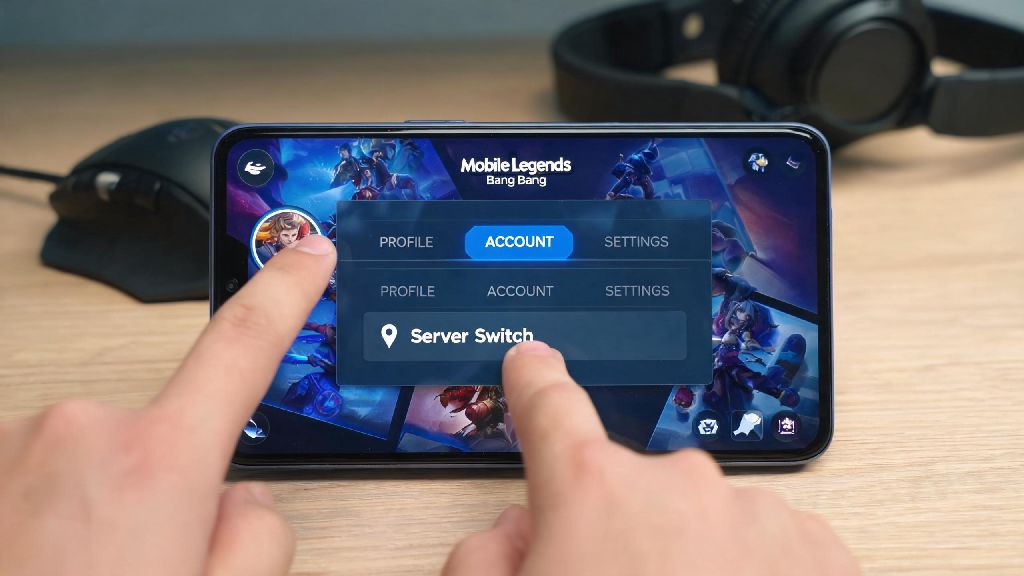
The safest way to adjust your in-game location is to use the official server switch tool built directly into Mobile Legends, no third-party software required. To use it, first open your profile page by tapping your avatar in the top left corner of the main lobby. From there, navigate to the “Account” tab, then select “Server List” to see all available servers you can switch to. You can only switch servers if you have no ongoing ranked matches, no unclaimed in-game rewards, and haven’t switched servers in the last 30 days. If you need to access a region that doesn’t show up in your official server list, you can use a reputable VPN to adjust your network location before opening the game. Never use location spoofers that tamper with the game’s core files, as these will trigger Moonton’s anti-cheat system and lead to a permanent account ban. Free VPNs that inject ads or run background scripts are also risky, as they often share your data and can get flagged as suspicious by the game’s security tools.
Key Benefits of Switching Your MLBB Location Legally
There are plenty of valid reasons to adjust your in-game location, and most players who do it aren’t trying to exploit the game. Lower ping is the most common reason players switch locations, especially if they travel frequently for work or vacation. Even a 50ms drop in ping can make a huge difference in ranked matches, where a split second reaction can mean the difference between winning a team fight and losing a star. Other players switch locations to play with friends who live in other countries, or to access exclusive content that’s only available in specific regions. Regional exclusive skins often have unique designs that never get released globally, so many players switch locations temporarily to grab them before they’re gone for good.
Just make sure you check the event rules before you switch locations to grab exclusive content. Some events have account region restrictions, so even if you switch servers, you won’t be able to claim rewards if your account is registered in a different region.
Risks to Avoid When Changing Your MLBB Location
While switching locations is safe if you follow the official rules, there are a few common mistakes that can lead to lost progress or even account bans. You can lose all your in-game progress if you switch to a new server without linking your account first. I’ve heard from dozens of players who forgot to link their account to Moonton, Google Play, or Facebook before switching servers, and lost all their skins, rank progress, and purchased diamonds when they logged into the new server. Moonton’s support team can rarely recover these accounts, so it’s not a risk worth taking. Another common risk is using free, untested VPNs or location spoofers that modify game data. Moonton’s anti-cheat system flags any software that interacts with the game’s core files, even if you’re just using it to change your location. Permanent bans are non-negotiable for this type of violation, so it’s always better to stick to the official tool or a well-known paid VPN. I made this mistake a few years back when I tried to use a free spoofer to get a Japanese-exclusive Hayabusa skin. I didn’t get banned, but I couldn’t claim the skin even after I finished all the event quests, because my account was registered in the US. It was a huge waste of time, and I learned my lesson to only use official methods for region switches after that.
Pro Tips for a Smooth Location Switch in MLBB
Even if you’re using the official server switch tool, there are a few small steps you can take to make the process go off without a hitch. First, always double check that your account is linked to at least two different platforms (like Moonton and Facebook) before you make any changes to your server or location. That way, if something goes wrong, you can easily recover your account. Test your ping on the new server before joining a ranked match. Play two or three classic or brawl matches first to make sure the connection is stable, and that there’s no unexpected lag or rubber-banding. If you’re switching locations temporarily for a trip, set a reminder to switch back to your home server once you return, so you don’t miss out on local events or rank resets for your region. Only use paid, reputable VPN services if you need to access a region not supported by the official server switch tool. These services don’t modify game files, they only adjust your network location, so they’re far less likely to get flagged by Moonton’s anti-cheat system. You should also avoid switching servers more than once every 30 days, even if the game lets you. Frequent server switches can flag your account for suspicious activity, even if you’re using the official tool.
Knowing how to change location on Mobile Legends opens up a ton of new gameplay options, from playing with friends across the world to getting lower ping when you travel. As long as you stick to the official server switch tool first, only use trusted third-party tools when you absolutely need to, and always back up your account before making any changes, you won’t have to worry about losing progress or getting banned. I switch locations every time I visit family in the Philippines, and following these steps has never gotten my account flagged, and I get to play with my old high school friends whenever I’m in town. It’s a small adjustment that makes a huge difference in how much you enjoy the game.